Documentation Index Fetch the complete documentation index at: https://auth0-feat-ionic-capacitor-quickstart-modernization.mintlify.app/llms.txt
Use this file to discover all available pages before exploring further.
Auth0がホストするデータベース構造を使用してユーザーを保存する場合は、同じテナントまたは別のテナントに対してユーザーを認証することで接続をテストできます。
Auth0へのユーザーをインポートを有効にしてテストする ユーザーのインポートを有効にすると、ユーザーは外部ユーザーストアからAuth0ユーザーストアに徐々に移行されます。このプロセスでは、ユーザーは初めてログインに成功したときに外部ストアに対して認証されます。以降のログイン試行はすべてAuth0ユーザーストアに対して実行されます。詳細については、「ユーザーのインポートとエクスポート 」の自動移行についてお読みください。
テストテナントおよびアプリケーションを作成する
Auth0 Dashboardを使用して新しいテナントを作成 します。
[Applications(アプリケーション)]>[Applications(アプリケーション)] に移動して、マシンツーマシン アプリケーションを作成します。カスタムデータベーススクリプトを作成する際には、クライアントID と クライアントシークレット をメモしておく必要があります。また、Management APIでスコープを有効にするためには、** クライアントID** をメモしておく必要があります。
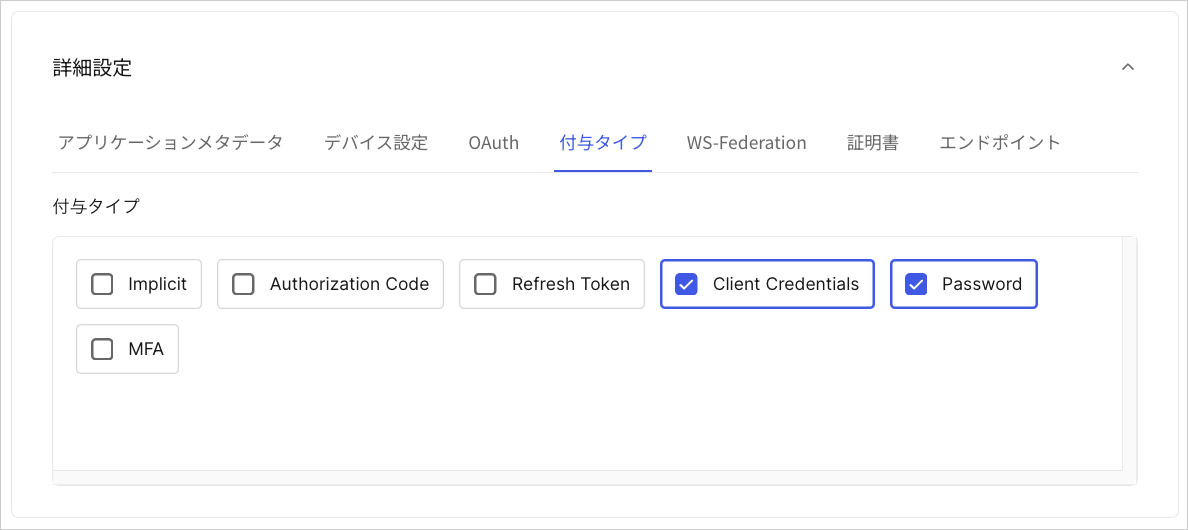
このアプリケーションに対して、パスワード と クライアント資格情報 付与の両方を有効にします(このテストでは両方の付与を有効にしてください)。
アプリケーションを承認するには、[Applications(アプリケーション)]>[APIs] に移動します。
[Management API] を選択します。
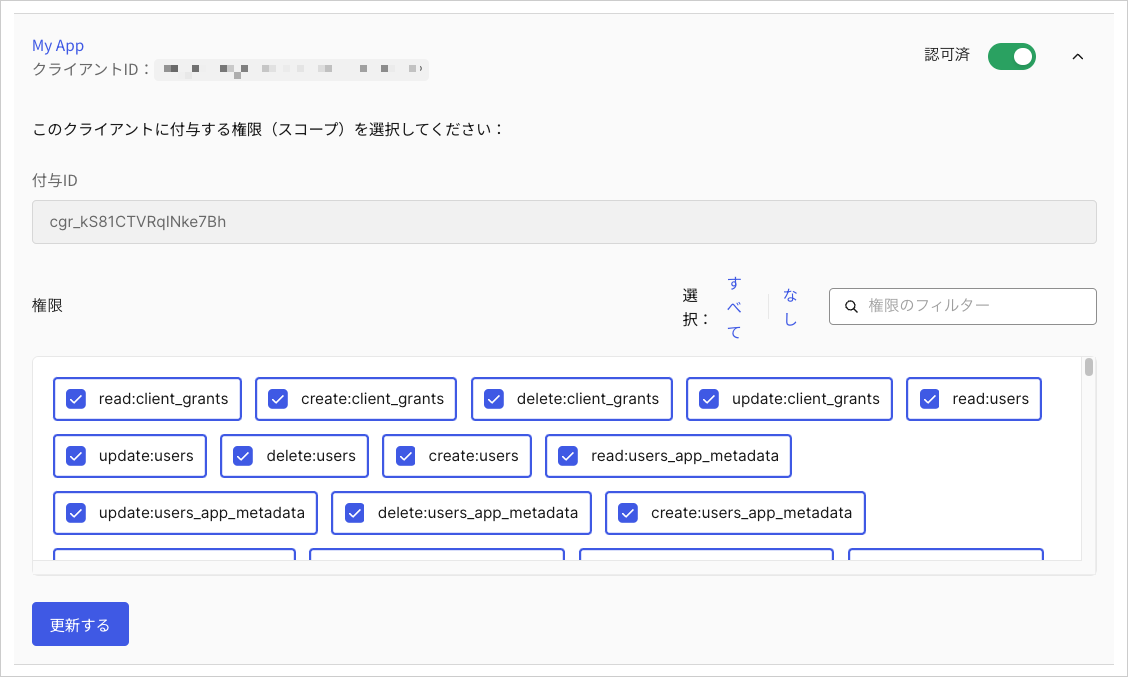
[Machine-to-Machine Applications(マシンツーマシンアプリケーション)] タブで、トグルを使用してテストアプリケーションを承認します。
ドロップダウンメニューを選択して、次のAuth0 Management APIのスコープを有効にします。
read:users
update:users
delete:users
create:users
read:users_app_metadata
update:users_app_metadata
create:users_app_metadata
データベース接続テストを作成する ダッシュボードでテナントとアプリケーションを作成したら、ソースデータベース接続とターゲットデータベース接続を作成します。
[Authentication(認証)]>[Database(データベース)] に移動して、新しいデータベース接続を作成してソースにします。
テストソース接続に名前を付け、[Requires Username(ユーザー名の要求)] を有効にし、** [Create(作成)]** を選択します。
手順2から同じ構成で、2番目のデータベースをターゲットとして作成します。
ターゲットDBとソースDBの両方で パスワードポリシー を [Non-empty password required(空でないパスワードが必要)] に設定すれば、テストで簡素なパスワードを使うことができます。
ターゲットデータベースでは、[Custom Database(カスタムデータベース)] ビューに切り替え、** [Use my own database(自分自身のデータベースを使用する)]** のトグルをオンにします。
Organizationsを使ってカスタムデータベースをテストしたい場合は、[Context object in database scripts(データベーススクリプト内のコンテキストオブジェクト)] を有効にします。
[Settings(設定)] ビューに切り替え、** [Import Users to Auth0(Auth0にユーザーをインポート)]** を有効にします。
[Custom Database(カスタムデータベース)] ビューに切り替え、** [Database settings(データベースの設定)]** を見つけます。手順1で作成したソースデータベースから次の情報を追加します。| キー | 値 |
| --- | --- |
| client_id | 作成したアプリケーションのクライアントID |
| client_secret | 作成したアプリケーションのクライアントシークレット |
| auth0_domain | Auth0ドメイン内のテナント名:yourTenant.us.auth0.com |
| source_database | ソース接続の名前 |
ターゲットデータベースで、Login(ログイン) およびGet User(ユーザーの取得) のデータベースアクションスクリプトを更新します。データベースアクションスクリプトを使用したベストプラクティスに関する詳細は、「カスタムデータベース接続とアクションスクリプトのベストプラクティス 」をお読みください。
各スクリプトで [Save and Try(保存して試す)] を選択します。Actions リアルタイムログconsole.log出力を監視してください。詳細については、「Actions リアルタイムログ 」をお読みください。
[Try Connection(接続を試す)] を選択して、接続ライブをテストします。
ユーザーインポートを有効にせずにテストする
テストテナントおよびアプリケーションを作成する で手順を繰り返します。1つのテストデータベース接続を作成します。
ソース データベース設定の [Import Users to Auth0(ユーザーをAuth0にインポート)] が無効になっていることを確認します。ユーザーは、ログイン試行ごとに外部ユーザーストアに対して認証を行います。
次のサンプルですべてのデータベースアクションスクリプトを更新します。
Get User(ユーザーの取得)スクリプト Get User(ユーザーの取得) スクリプトは、ユーザーの現在の状態を判別する実行可能関数を実装します。[Import Users to Auth0(ユーザーをAuth0にインポート)] が有効になっている場合、ユーザーがサインアップしようとすると、Get User(ユーザーの取得)スクリプトが実行され、ユーザーが外部ユーザーストアに既に存在するかどうかが確認されます。Get User(ユーザーの取得)スクリプトは、ユーザーが次の操作を試みる場合にも実行されます。
[Import Users to Auth0(ユーザーをAuth0にインポート)] が無効になっている場合、ユーザーがサインアップしようとすると、Get Userスクリプトが実行され、ユーザーが外部ユーザーストアに既に存在するかどうかが確認されます。ユーザーが外部ユーザーストアに存在している場合、Create(作成)スクリプトは実行されません。Get User(ユーザーの取得)スクリプトは、ユーザーが次の操作を試みる場合にも実行されます。
async function getUser ( user , context , callback ) { log ( `Script started.` ); log ( `Requesting an Access Token from " ${ configuration . auth0_domain } ".` ); let accessToken = await getAccessToken (); accessToken = accessToken . access_token ; if ( ! accessToken ) return log ( `Failed to get an Access Token from " ${ configuration . auth0_domain } ".` , true ); log ( `The Access Token is available. Searching for user " ${ user } " in " ${ configuration . source_database } "` ); user = user . toLowerCase (); const searchQuery = encodeURI ( `identities.connection:" ${ configuration . source_database } "+AND+(email: ${ user } OR username: ${ user } )` ); var options = { method: `GET` , url: `https:// ${ configuration . auth0_domain } /api/v2/users?q= ${ searchQuery } ` , headers: { Authorization: `Bearer ${ accessToken } ` , } }; request ( options , function ( error , response ) { if ( error ) return log ( `Cannot connect to " ${ configuration . source_database } " database.` , true ); let search_results = JSON . parse ( response . body ); let profile = null ; if ( search_results . length > 0 ) { log ( `A user " ${ user } " is FOUND in " ${ configuration . source_database } " database.` ); profile = { user_id: search_results [ 0 ]. user_id . toString (), nickname: search_results [ 0 ]. nickname , username: search_results [ 0 ]. username , email: search_results [ 0 ]. email }; } else { log ( `A user " ${ user } " is NOT FOUND in " ${ configuration . source_database } " database.` ); } log ( `Script completed!` ); return callback ( null , profile ); }); /* -- GET ACCESS TOKEN VIA CLIENT CREDENTIALS -- */ async function getAccessToken () { var options = { method: `POST` , url: `https:// ${ configuration . auth0_domain } /oauth/token` , headers: { "Content-Type" : `application/x-www-form-urlencoded` , }, form: { grant_type: `client_credentials` , client_id: configuration . client_id , client_secret: configuration . client_secret , audience: `https:// ${ configuration . auth0_domain } /api/v2/` }, json: true }; return new Promise ( function ( resolve ) { request ( options , function ( error , response ) { resolve ( error || response . body ); }); }); } /* -- LOGGING -- */ function log ( message , error = false ) { const script_name = `GET USER` ; const error_label = error ? `(ERROR)` : `` ; const return_message = ` ${ script_name } : ${ error_label } ${ message } ` ; console . log ( return_message ); if ( error ) return callback ( new Error ( return_message )); } }
Login(ログイン)スクリプト Login(ログイン) スクリプトは、ユーザーがログインするときにユーザーを認証する実行可能関数を実装します。ユーザーがターゲットデータベース(Auth0)に存在する場合は、そのレコードを使用して認証します。それ以外の場合は、ソースデータベース(外部)内のレコードを使用してユーザーを認証します。function login ( usernameOrEmail , password , context , callback ) { log ( `Script started.` ); const jwt = require ( 'jsonwebtoken' ); const options = { method: `POST` , url: `https:// ${ configuration . auth0_domain } /oauth/token` , headers: { "Content-Type" : `application/x-www-form-urlencoded` }, json: true , form: { grant_type: `http://auth0.com/oauth/grant-type/password-realm` , client_id: configuration . client_id , client_secret: configuration . client_secret , username: usernameOrEmail , password: password , realm: ` ${ configuration . source_database } ` } }; request ( options , function ( error , response , body ) { log ( `Attempting to authenticate a user " ${ usernameOrEmail } " against " ${ configuration . source_database } " database in " ${ configuration . auth0_domain } " tenant.` ); if ( error ) return log ( `Cannot connect to " ${ configuration . auth0_domain } " database.` , true ); if ( response . statusCode !== 200 ) { console . log ( `LOGIN: (ERROR) ${ response . body . error_description } ` ); return callback ( new WrongUsernameOrPasswordError ( usernameOrEmail , `LOGIN: (ERROR) ${ response . body . error_description } ` )); } log ( `Successfuly authenticated user " ${ usernameOrEmail } " against " ${ configuration . source_database } " database in " ${ configuration . auth0_domain } " tenant.` ); const decoded_id_token = jwt . decode ( body . id_token ); const profile = { user_id: decoded_id_token . sub , nickname: decoded_id_token . nickname , username: decoded_id_token . username , email: decoded_id_token . email }; log ( `Script completed.` ); return callback ( null , profile ); }); /* -- LOGGING -- */ function log ( message , error = false ) { const script_name = `LOGIN` ; const error_label = error ? `(ERROR)` : `` ; const return_message = ` ${ script_name } : ${ error_label } ${ message } ` ; console . log ( return_message ); if ( error ) return callback ( new Error ( return_message )); } }
Create(作成)スクリプト Create(作成)スクリプト は、ユーザーがユニバーサルログインを通じてサインアップしたとき、またはAuth0 Dashboard Management API async function create ( user , context , callback ) { log ( `Script started.` ); log ( `Requesting an Access Token from " ${ configuration . auth0_domain } ".` ); let accessToken = await getAccessToken (); if ( ! accessToken . access_token ) return log ( `Failed to get an Access Token from " ${ configuration . auth0_domain } ".` , true ); accessToken = accessToken . access_token ; log ( `The Access Token is available. Attempting to create a user " ${ user . email } " in " ${ configuration . source_database } "` ); const options = { method: `POST` , url: `https:// ${ configuration . auth0_domain } /api/v2/users` , headers: { Authorization: `Bearer ${ accessToken } ` , "Content-Type" : `application/x-www-form-urlencoded` }, form: { connection: configuration . source_database , email: user . email , password: user . password , username: user . username }, json: true }; request ( options , function ( error , response ) { if ( error ) return log ( `Cannot connect to " ${ configuration . source_database } " database.` , true ); switch ( response . statusCode ) { case 201 : log ( `The user " ${ user . email } " is successfuly created in " ${ configuration . source_database } " database.` ); return callback ( null ); case 409 : return callback ( new ValidationError ( `user_exists` , `The user already exists in " ${ configuration . source_database } " database.` )); default : return log ( `Failed to create a user " ${ user . email } " in " ${ configuration . source_database } " database. Error: " ${ response . statusCode } , ${ response . body . message } "` , true ); } }); /* -- GET ACCESS TOKEN VIA CLIENT CREDENTIALS -- */ async function getAccessToken () { var options = { method: `POST` , url: `https:// ${ configuration . auth0_domain } /oauth/token` , headers: { "Content-Type" : `application/x-www-form-urlencoded` , }, form: { grant_type: `client_credentials` , client_id: configuration . client_id , client_secret: configuration . client_secret , audience: `https:// ${ configuration . auth0_domain } /api/v2/` }, json: true }; return new Promise ( function ( resolve ) { request ( options , function ( error , response ) { resolve ( error || response . body ); }); }); } /* -- LOGGING -- */ function log ( message , error = false ) { const script_name = `CREATE` ; const error_label = error ? `(ERROR)` : `` ; const return_message = ` ${ script_name } : ${ error_label } ${ message } ` ; console . log ( return_message ); if ( error ) return callback ( new Error ( return_message )); } }
Delete(削除)スクリプト Delete(削除)スクリプト は、Auth0 DashboardまたはAuth0 Management APIを使用してユーザーが削除されたときに、同じ操作でAuth0と外部データベースからユーザーを削除する実行可能関数を実装します。async function deleteUser ( user , context , callback ) { log ( `Script started.` ); log ( `Requesting an Access Token from " ${ configuration . auth0_domain } ".` ); let accessToken = await getAccessToken (); if ( ! accessToken . access_token ) return log ( `Failed to get an Access Token from " ${ configuration . auth0_domain } ".` , true ); accessToken = accessToken . access_token ; log ( `The Access Token is available. Attempting to delete a user " ${ user } " from " ${ configuration . source_database } "` ); const options = { method: `DELETE` , url: `https:// ${ configuration . auth0_domain } /api/v2/users/ ${ user } ` , headers: { Authorization: `Bearer ${ accessToken } ` , "Content-Type" : `application/x-www-form-urlencoded` }, json: true }; request ( options , function ( error , response ) { if ( error ) return log ( `Cannot connect to " ${ configuration . source_database } " database.` , true ); switch ( response . statusCode ) { case 204 : log ( `The user " ${ user } " is successfuly deleted from " ${ configuration . source_database } " database.` ); return callback ( null ); default : return log ( `Failed to delete a user " ${ user } " from " ${ configuration . source_database } " database. Error: " ${ response . statusCode } , ${ response . body . message } "` , true ); } }); /* -- GET ACCESS TOKEN VIA CLIENT CREDENTIALS -- */ async function getAccessToken () { var options = { method: `POST` , url: `https:// ${ configuration . auth0_domain } /oauth/token` , headers: { "Content-Type" : `application/x-www-form-urlencoded` , }, form: { grant_type: `client_credentials` , client_id: configuration . client_id , client_secret: configuration . client_secret , audience: `https:// ${ configuration . auth0_domain } /api/v2/` }, json: true }; return new Promise ( function ( resolve ) { request ( options , function ( error , response ) { resolve ( error || response . body ); }); }); } /* -- LOGGING -- */ function log ( message , error = false ) { const script_name = `DELETE` ; const error_label = error ? `(ERROR)` : `` ; const return_message = ` ${ script_name } : ${ error_label } ${ message } ` ; console . log ( return_message ); if ( error ) return callback ( new Error ( return_message )); } }
Verify(検証)スクリプト Verify(検証)スクリプト は、ユーザーがAuth0から送信された検証メール内のリンクをクリックしたときに、外部データベース内のユーザーのメールアドレスの検証ステータスをマークする実行可能関数を実装します。async function verify ( user , context , callback ) { log ( `Script started.` ); log ( `Requesting an Access Token from " ${ configuration . auth0_domain } ".` ); let accessToken = await getAccessToken (); if ( ! accessToken . access_token ) return log ( `Failed to get an Access Token from " ${ configuration . auth0_domain } ".` , true ); accessToken = accessToken . access_token ; log ( `The Access Token is available. Searching for user " ${ user } " in " ${ configuration . source_database } "` ); user = user . toLowerCase (); const searchQuery = encodeURI ( `identities.connection:" ${ configuration . source_database } "+AND+(email: ${ user } OR username: ${ user } )` ); var options = { method: `GET` , url: `https:// ${ configuration . auth0_domain } /api/v2/users?q= ${ searchQuery } ` , headers: { Authorization: `Bearer ${ accessToken } ` , } }; request ( options , function ( error , response ) { if ( error ) return log ( `Cannot connect to " ${ configuration . source_database } " database.` , true ); let search_results = JSON . parse ( response . body ); if ( search_results . length > 0 ) { log ( `A user " ${ user } " is found in " ${ configuration . source_database } " database.` ); const user_id = search_results [ 0 ]. user_id . toString (); log ( `Attempting to mark user " ${ user_id } " as verified in " ${ configuration . source_database } " database` ); const options = { method: `PATCH` , url: `https:// ${ configuration . auth0_domain } /api/v2/users/ ${ user_id } ` , headers: { Authorization: `Bearer ${ accessToken } ` , "Content-Type" : `application/x-www-form-urlencoded` }, form: { email_verified: true , }, json: true }; request ( options , function ( error , response ) { if ( error ) return log ( `Cannot connect to " ${ configuration . source_database } " database.` , true ); switch ( response . statusCode ) { case 200 : log ( `The user " ${ user } " is marked as verified in " ${ configuration . source_database } " database.` ); return callback ( null , true ); default : return log ( `Failed to mark a user " ${ user } " as verified in " ${ configuration . source_database } " database. Error: " ${ response . statusCode } , ${ response . body . message } "` , true ); } }); } else { log ( `A user " ${ user } " is not found in " ${ configuration . source_database } " database. Unable to verify.` , true ); } }); /* -- GET ACCESS TOKEN VIA CLIENT CREDENTIALS -- */ async function getAccessToken () { var options = { method: `POST` , url: `https:// ${ configuration . auth0_domain } /oauth/token` , headers: { "Content-Type" : `application/x-www-form-urlencoded` , }, form: { grant_type: `client_credentials` , client_id: configuration . client_id , client_secret: configuration . client_secret , audience: `https:// ${ configuration . auth0_domain } /api/v2/` }, json: true }; return new Promise ( function ( resolve ) { request ( options , function ( error , response ) { resolve ( error || response . body ); }); }); } /* -- LOGGING -- */ function log ( message , error = false ) { const script_name = `VERIFY` ; const error_label = error ? `(ERROR)` : `` ; const return_message = ` ${ script_name } : ${ error_label } ${ message } ` ; console . log ( return_message ); if ( error ) return callback ( new Error ( return_message )); } }
Change Password(パスワードの変更)スクリプト Change Password(パスワードの変更)スクリプト は、Auth0 DashboardまたはAuth0 Management APIからパスワード変更ワークフローが開始されたときに、外部データベース内のユーザーのパスワードを更新する実行可能関数を実装します。async function changePassword ( user , newPassword , context , callback ) { log ( `Script started.` ); log ( `Requesting an Access Token from " ${ configuration . auth0_domain } ".` ); let accessToken = await getAccessToken (); if ( ! accessToken . access_token ) return log ( `Failed to get an Access Token from " ${ configuration . auth0_domain } ".` , true ); accessToken = accessToken . access_token ; log ( `The Access Token is available. Searching for user " ${ user } " in " ${ configuration . source_database } " database.` ); user = user . toLowerCase (); const searchQuery = encodeURI ( `identities.connection:" ${ configuration . source_database } "+AND+(email: ${ user } OR username: ${ user } )` ); var options = { method: `GET` , url: `https:// ${ configuration . auth0_domain } /api/v2/users?q= ${ searchQuery } ` , headers: { Authorization: `Bearer ${ accessToken } ` , } }; request ( options , function ( error , response ) { if ( error ) return log ( `Cannot connect to " ${ configuration . source_database } " database.` , true ); let search_results = JSON . parse ( response . body ); if ( search_results . length > 0 ) { log ( `A user " ${ user } " is found in " ${ configuration . source_database } " database.` ); const user_id = search_results [ 0 ]. user_id . toString (); log ( `Attempting to change password for user " ${ user_id } " in " ${ configuration . source_database } " database.` ); const options = { method: `PATCH` , url: `https:// ${ configuration . auth0_domain } /api/v2/users/ ${ user_id } ` , headers: { Authorization: `Bearer ${ accessToken } ` , "Content-Type" : `application/x-www-form-urlencoded` }, form: { password: newPassword , }, json: true }; request ( options , function ( error , response ) { if ( error ) return log ( `Cannot connect to " ${ configuration . source_database } " database.` , true ); switch ( response . statusCode ) { case 200 : log ( `The user " ${ user } " password successfully changed in " ${ configuration . source_database } " database.` ); return callback ( null , true ); default : return log ( `Failed to change password for " ${ user } " in " ${ configuration . source_database } " database. Error: " ${ response . statusCode } , ${ response . body . message } "` , true ); } }); } else { log ( `A user " ${ user } " is not found in " ${ configuration . source_database } " database. Unable to change password.` , true ); } }); /* -- GET ACCESS TOKEN VIA CLIENT CREDENTIALS -- */ async function getAccessToken () { var options = { method: `POST` , url: `https:// ${ configuration . auth0_domain } /oauth/token` , headers: { "Content-Type" : `application/x-www-form-urlencoded` , }, form: { grant_type: `client_credentials` , client_id: configuration . client_id , client_secret: configuration . client_secret , audience: `https:// ${ configuration . auth0_domain } /api/v2/` }, json: true }; return new Promise ( function ( resolve ) { request ( options , function ( error , response ) { resolve ( error || response . body ); }); }); } /* -- LOGGING -- */ function log ( message , error = false ) { const script_name = `CHANGE PASSWORD` ; const error_label = error ? `(ERROR)` : `` ; const return_message = ` ${ script_name } : ${ error_label } ${ message } ` ; console . log ( return_message ); if ( error ) return callback ( new Error ( return_message )); } }
Change Email(メールの変更)スクリプト Change Email(メールの変更)スクリプト は、ユーザーがメールアドレスまたはメールアドレスの検証ステータスを変更したときに、ユーザーのメールアドレスを更新する実行可能関数を実装します。このスクリプトはAuth0 Dashboardでは利用できません。Management API接続を更新 エンドポイントを呼び出し、options.customScripts.change_emailプロパティを提供する必要があります。
async function changeEmail ( user , newEmail , verified , callback ) { log ( `Script started.` ); log ( `Requesting an Access Token from " ${ configuration . auth0_domain } ".` ); let accessToken = await getAccessToken (); if ( ! accessToken . access_token ) return log ( `Failed to get an Access Token from " ${ configuration . auth0_domain } ".` , true ); accessToken = accessToken . access_token ; log ( `The Access Token is available. Searching for user " ${ user } " in " ${ configuration . source_database } " database.` ); user = user . toLowerCase (); const searchQuery = encodeURI ( `identities.connection:" ${ configuration . source_database } "+AND+(email: ${ user } OR username: ${ user } )` ); var options = { method: `GET` , url: `https:// ${ configuration . auth0_domain } /api/v2/users?q= ${ searchQuery } ` , headers: { Authorization: `Bearer ${ accessToken } ` , } }; request ( options , function ( error , response ) { if ( error ) return log ( `Cannot connect to " ${ configuration . source_database } " database.` , true ); let search_results = JSON . parse ( response . body ); if ( search_results . length > 0 ) { log ( `A user " ${ user } " is found in " ${ configuration . source_database } " database.` ); const user_id = search_results [ 0 ]. user_id . toString (); log ( `Attempting to change email / verified status for user " ${ user_id } " in " ${ configuration . source_database } " database.` ); const options = { method: `PATCH` , url: `https:// ${ configuration . auth0_domain } /api/v2/users/ ${ user_id } ` , headers: { Authorization: `Bearer ${ accessToken } ` , "Content-Type" : `application/x-www-form-urlencoded` }, form: { email: newEmail , email_verified: verified || false }, json: true }; request ( options , function ( error , response ) { if ( error ) return log ( `Cannot connect to " ${ configuration . source_database } " database.` , true ); switch ( response . statusCode ) { case 200 : log ( `The user " ${ user } " email / verified status successfully changed in " ${ configuration . source_database } " database.` ); return callback ( null , true ); default : return log ( `Failed to change email / verified status for " ${ user } " in " ${ configuration . source_database } " database. Error: " ${ response . statusCode } , ${ response . body . message } "` , true ); } }); } else { log ( `A user " ${ user } " is not found in " ${ configuration . source_database } " database. Unable to change email / verified status.` , true ); } }); /* -- GET ACCESS TOKEN VIA CLIENT CREDENTIALS -- */ async function getAccessToken () { var options = { method: `POST` , url: `https:// ${ configuration . auth0_domain } /oauth/token` , headers: { "Content-Type" : `application/x-www-form-urlencoded` , }, form: { grant_type: `client_credentials` , client_id: configuration . client_id , client_secret: configuration . client_secret , audience: `https:// ${ configuration . auth0_domain } /api/v2/` }, json: true }; return new Promise ( function ( resolve ) { request ( options , function ( error , response ) { resolve ( error || response . body ); }); }); } /* -- LOGGING -- */ function log ( message , error = false ) { const script_name = `CHANGE EMAIL` ; const error_label = error ? `(ERROR)` : `` ; const return_message = ` ${ script_name } : ${ error_label } ${ message } ` ; console . log ( return_message ); if ( error ) return callback ( new Error ( return_message )); } }
もっと詳しく